 Home
Home About
About Courses
 AI Automation Campus
 Altcoins Campus
 Business Campus
 Client Acquisition Campus
 Marketing Campus
 Ecommerce Campus
 Fitness Campus
 Download App
 Articles
Download
The Real World App

Install The Real World on any device in under a minute.
Just open your browser, tap install, and start learning how to make money.



155,000+ like-minded students

The Real World App On Every Device You Own
The Real World app runs as a Progressive Web App, so it installs straight from this website. No App Store, no Play Store, no middleman. One link, one tap, and it sits on your home screen like any other app.
Install it on iPhone, iPad, Android or desktop. Your login is the same everywhere, so you can start a lesson on your phone and finish it on your laptop.
Because it updates from the web, you are always on the newest version. Nothing to re-download, no update prompts, no waiting on an app store to approve anything. Every campus, every live session and the chat are there the second you log in.

INSTALL THE REAL WORLD
Click the install icon to add it to your device.
Active Students
Campuses


How To Install
Install On Any Device In Under A Minute
Pick your platform below. The whole thing takes under a minute.
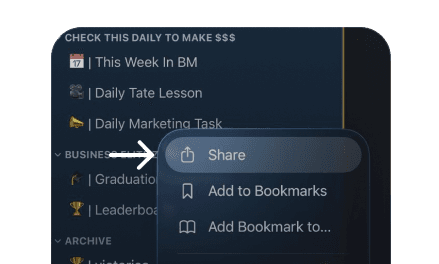
Safari
iPhone & iPad
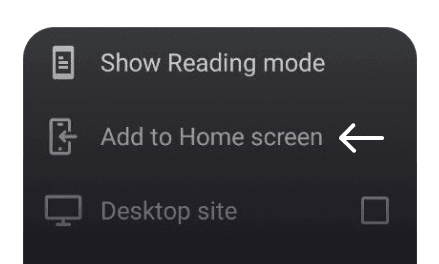
Chrome
Android
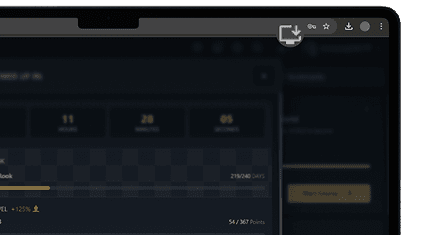
Chrome, Edge, Brave & similar
Desktop
Inside The App
Every Campus,
One Install
Installing the app opens every campus at once, not one course at a time. 10+ campuses, daily live lessons from professors who still earn from what they teach, the full lesson library and the chat, all behind one login.
Frequently Asked
Questions
The Real World app is a Progressive Web App, which installs to your device straight from your browser. It means updates reach you the moment they ship instead of waiting on store approval, and it's the same app on every platform.
No. You can use it in any browser at app.jointherealworld.com. Installing puts it on your home screen and opens it in its own window, without the browser bars.
Yes. Install it on as many devices as you like and log in with the same account. Your progress is tied to your account, not to the device.
No. It updates itself from the web, so you're always on the current version.
Yes. You're installing from jointherealworld.com over an encrypted connection, and the app runs inside your browser's own security sandbox. There's nothing to sideload and no third-party download to trust.
Stay Up To Date With The Latest
Information On Wealth Generation
Join our email newsletter to access the latest insights on wealth
generation and financial success.